

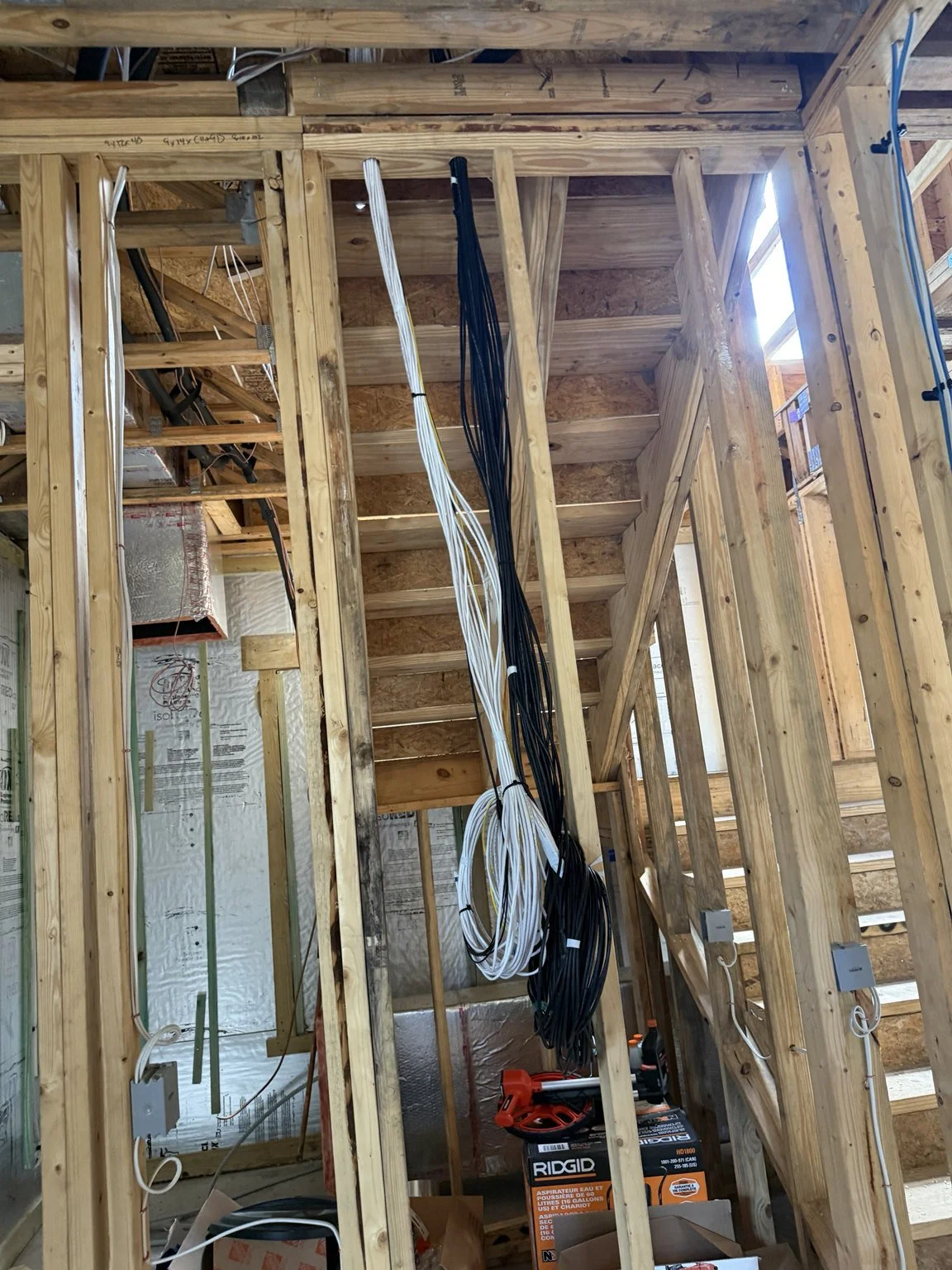
During construction, it is easy to focus on the equipment you expect to see: a television, speakers, cameras or a wireless access point. The cable paths and equipment locations that support those devices are less visible, but they are often the decisions that are hardest to change after the walls are finished.
Low-voltage prewiring turns those decisions into a coordinated plan while the structure is accessible. It does not require choosing every future device immediately. It does require knowing how the home will be used, where connections belong and how later installation will reach them. For new homes in Jacksonville and Northeast Florida, early coordination can help avoid treating technology as a series of unrelated last-minute additions.
Start with rooms and activities
Review the floor plan around everyday needs. Where will people work, stream, watch movies and listen to music? Which television locations need hardwired connectivity? Where should exterior cameras observe approaches or entrances? Are there patios, detached buildings or a future gate to consider?
Furniture and architectural finishes matter. A network outlet should be useful at the intended desk or media location, not simply easy to mark on an empty wall. Speaker positions should relate to seating and listening areas. Coordinate likely uses before cable locations are finalized, and clearly distinguish essential infrastructure from optional future provisions.
Bring the different systems into one plan
Networking, Wi-Fi, cameras, audio and AV have different connection requirements, but their routes and equipment locations often overlap. Considering them together helps avoid conflicting wall locations and separate cable bundles with no shared organization. The design should show which cables serve each destination and where they return.
Cat6 can support suitable network connections, including outlets and wired access-point or PoE camera locations. Audio and AV require their own appropriate cabling and pathways. A cable category alone does not guarantee every future application; the installed length, termination, equipment and testing also matter. Plan around intended functions rather than a broad promise that the house is future-proof.
Choose the main technology location deliberately
A main rack or distribution location needs space for cabling, equipment, power and service access. Consider ventilation, access after construction and how the equipment fits the finished home. A cramped cabinet in an unsuitable environment can make later installation and maintenance difficult even when the cable runs themselves are well planned.
Larger homes may need a second distribution point. A backbone connects that location to the main technology area. Fiber can be part of such a design, but routing fiber is different from terminating, testing and commissioning the finished link. The proposal should state which phase includes each task.
Prewire Wi-Fi where coverage is needed
One cable beside the internet modem does not provide a complete access-point plan. Consider the building's levels, dimensions, materials and outdoor areas. Place planned access-point connections where compatible equipment can serve the intended spaces with an appropriate wired connection to the network.
The design may be refined when the home is finished and equipment is installed. Coverage should then be checked in the real rooms, with normal furnishings and operating devices. Prewire provides useful connection locations; it does not establish that Wi-Fi performance has already been measured in a completed home.
Plan camera routes and exterior details
Camera prewire should follow intended views rather than evenly spaced cable ends. Discuss entrances, driveways and other legitimate coverage needs, then consider mounting surfaces, access and weather-protected connections. Avoid locating a cable where a camera would have an obstructed view or be difficult to service.
Exterior pathways need appropriate materials and protection. Connections to a gate or outbuilding can involve distance, buried infrastructure and coordination with other trades. Those provisions should be designed for the site and clearly documented. A pathway for a future camera is useful infrastructure, but it is not an installed security system.
Coordinate audio and media locations before finishes
Whole-home audio zones should follow how spaces will be used. A kitchen and patio may need different placement and operating expectations. A surround-sound room requires a layout around the screen and listening positions rather than a generic pair of ceiling speakers.
Media boxes and conduit can help coordinate display locations and future cable replacement where appropriate. Size, route, bends, access and termination points matter. Conduit is not automatically useful if it ends somewhere inaccessible or cannot accommodate the intended cable. Plan the finished wall and the technology together, especially where cabinetry or other contractors are involved.
Provide a clear service-provider handoff
The internet provider needs a defined path into the home's network infrastructure. A demarcation pathway helps connect that handoff to the main technology location. Coordinate communications cabling and access with the builder and provider rather than assuming service will enter wherever the rack happens to be.
Future backup power or ISP failover can influence equipment space and connection planning. Keep these design provisions separate from installed hardware. A home does not have operational failover simply because a drawing reserves room for a second connection or a UPS.
What the completed prewire phase looks like
Bold City's ongoing new-construction technology project demonstrates this approach. The completed prewire phase includes Cat6 throughout the residence, access-point and camera locations, downstairs MDF and upstairs IDF locations, and fiber backbone cabling routed for later termination.
Audio prewire serves the Great Room, Kitchen, Back Patio and Game Room, including surround sound in the Game Room. AV pathways, the ISP demarcation route and future gate/outbuilding connectivity were considered together. Speakers, cameras, network equipment and final commissioning belong to later phases; the completed work described here is the infrastructure.
Agree on documentation and the next phase
Before drywall, review cable destinations, labels and the planned routes with the installation team. Photograph useful pathways without including private documents or personal details. Confirm which checks are appropriate at rough-in and which termination and equipment tests will follow during trim-out.
A clear handoff keeps the next phase connected to the original design. Bold City Smart Home provides structured cabling and infrastructure, professional networking and Wi-Fi, and home theater and audio planning. Contact us while your construction plans are developing to coordinate the technology foundation before the walls close.
